Eli Actions
Updated October 26, 2026
Tell Eli what you need and let it handle products, artwork, settings, promotions, and orders
Eli is your AI assistant built into the Fourthwall dashboard. With Eli Actions, you can create products, adjust artwork, bulk-edit shop settings, set up promotions, and manage orders using plain language instead of navigating through menus. Describe what you want, and Eli takes care of the rest. Order changes run only after you approve them.
Open Eli
Click the purple sparkle button in the top-right corner of any dashboard page, next to Place order. Eli opens in a panel on the right side of the screen. Type your request in the Ask anything box, or pick one of the suggested topics above it.
On the dashboard Home page, you can also type your request straight into the What can I help with? box at the top of the page.
If you don't see the sparkle button, Eli may be turned off. See Turn Eli on or off.
What Eli can do
Eli Actions covers five main areas of your shop:
- Product creation. Tell Eli what you want to sell and it builds the product listing for you.
- Artwork editing. Scale, move, and rotate artwork on a product using natural language.
- Bulk shop settings. Ask Eli to change settings across your shop in one command.
- Promotions. Describe the discount you have in mind and Eli creates it.
- Order management. Look up orders and propose refunds, cancellations, shipping address changes, and tracking edits for you to approve.

Turn Eli on or off
You can control whether Eli appears in your dashboard from Account > AI. Toggle Enable Eli (personal assistant) to turn the assistant on or off at any time.
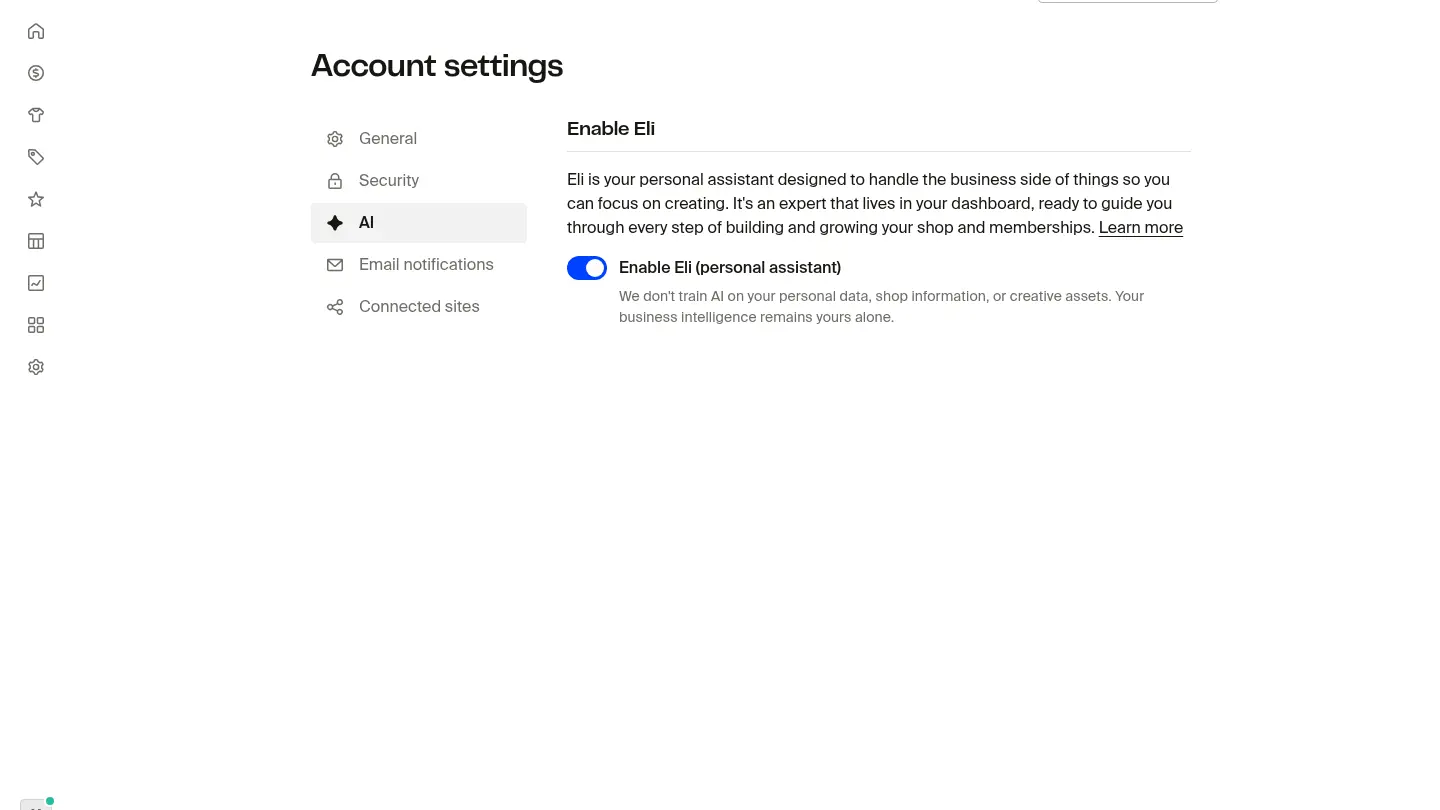
We don't train AI on your personal data, shop information, or creative assets. Your business intelligence remains yours alone.
Eli is included on every Fourthwall plan in supported regions. Eli has a weekly usage limit on every plan, and Fourthwall Pro includes a higher limit than the free plan.
Create products with Eli
You can ask Eli to create a product by describing what you want in plain language. For example:
- "Use this logo on a mug"
- "Create a t-shirt with my latest design"
- "Add a hoodie to my shop with this artwork"
Eli picks the right product type, applies your design, and sets up the listing. You can review and adjust the details before publishing.
Here's how to get started:
- Open the Eli chat panel from your dashboard.
- Type a product request in your own words.
- Review the product details Eli creates.
- Make any changes you want, then publish.
Be specific about the product type and design you want. "Put my cat logo on a black mug" gives Eli more to work with than "make a product."
Edit artwork with Eli
Once a product has artwork, you can ask Eli to scale, move, or rotate the design without opening the product editor. Eli applies the change and shows you a preview so you can confirm before saving.
Scale artwork
Set the artwork size as a fraction of the print region, or multiply the current size by a percentage.
- "Make the artwork 50% of the print region"
- "Make the artwork 30% larger"
- "Reduce the artwork size by 25%"

Move artwork
Snap the artwork to an anchor point on the print region, or shift it by a fraction of the region in any direction. Anchor points include the corners (top-left, top-right, bottom-left, bottom-right), the edges (top-center, bottom-center, center-left, center-right), and the center.
- "Move the artwork to the top center"
- "Pin the design to the bottom-right corner"
- "Shift the artwork up 10%"

Rotate artwork
Rotate the artwork by a specific number of degrees.
- "Rotate the artwork 90 degrees"
- "Turn the design 180 degrees"
- "Rotate the artwork 45 degrees clockwise"
Products with multiple artworks
If a product has more than one artwork, you can target each one separately in the same conversation. Refer to artworks by their order ("the first artwork", "the second artwork") or by size ("the smaller image", "the larger image").
- "Make the smaller artwork 40% larger and move it up 10%"
- "Shrink the second artwork by 30%"
Eli confirms each change and lists what it updated so you can verify before saving.

Bulk artwork edits
You can ask Eli to apply the same artwork change to several products at once. Useful when you want to resize or reposition the same design across a collection.
- "Make the artwork 40% of the print region on all my mugs"
- "Move the design up 10% on every t-shirt"
External AI tools that connect to Fourthwall, like ChatGPT or other AI integrations, can also run these artwork operations. The commands work the same whether you type them into Eli or into a connected AI tool.
Bulk-edit shop settings
Instead of clicking through each setting one by one, you can ask Eli to make changes across your shop in a single request. For example:
- "Mark all my products as public"
- "Set my new theme live"
- "Hide all out-of-stock products"
Eli applies the changes and confirms what it updated so you can verify.

Eli can update product visibility, theme settings, artwork placement, and other shop-wide configurations. Storefront editing (custom layout and design changes) is not yet supported through Eli.
Create promotions with Eli
Setting up discounts and promotions is as simple as describing what you want. For example:
- "10% off everything"
- "Free shipping in the US"
- "Buy 2, get 1 free on all t-shirts"
Eli creates the promotion with the rules you described. You can review the details and adjust conditions like expiration dates or product exclusions before activating.
To create a promotion with Eli:
- Open the Eli chat panel.
- Describe the promotion you want.
- Review the promotion details and conditions.
- Confirm to activate.
You can combine Eli-created promotions with your existing ones. Check your Promotions page to see all active promotions.
Manage orders with Eli
Eli can look up your orders and propose four order actions. Each change runs only after you review and approve it.
- Refund an amount. Refund a specific amount on an order.
- Cancel an order. Cancel a whole order, or only some of its items. Eli checks eligibility first, and not every order or item can be canceled.
- Change the shipping address. Update the address only before the order goes into production or ships, and only when the order allows the change.
- Edit tracking. Update tracking on an existing self-fulfilled shipment. Eli can't edit tracking on shipments fulfilled by Fourthwall, and it can't create a new fulfillment.
For example:
- "Refund [amount] on order [order number]"
- "Cancel the [item] from order [order number]"
- "Change the shipping address on order [order number]"
- "Update the tracking number on order [order number]"
Before you approve a refund or cancellation, Eli previews the cost. The proposal includes any estimated amount charged to your card.
Important: Refunds and cancellations can't be undone. A refund on its own doesn't cancel the order or stop production and shipping. To stop an eligible order, ask Eli to cancel it.
What Eli can't do
Eli can't release payout holds, arrange reprints or replacements for an order, or recover access to your account. For a payout hold or account access, email support@fourthwall.com with your shop URL. For a reprint or replacement on a customer's order, ask your customer to contact Fourthwall through your shop's contact page (yourshop.fourthwall.com/contact) with the order number. For an order you placed yourself, such as a sample, email support with the order ID.
Frequently asked questions
Does Eli replace the regular product creation flow?
No. Eli is an additional way to create products. You can still use the full product editor in your dashboard for more detailed control.
Can Eli edit existing products?
Yes. Eli can scale, move, and rotate artwork on existing products, and bulk-edit shop settings like product visibility. For detailed changes to product copy and pricing, use the product editor directly.
Can Eli edit artwork on more than one product at once?
Yes. Ask Eli to apply the same artwork change to a group of products, like "Make the artwork 40% of the print region on all my mugs," and it runs the update across each one.
Can external AI tools edit artwork too?
Yes. AI tools that connect to Fourthwall can run the same artwork operations Eli runs. Sizing, moving, and rotating commands work the same way through any supported integration.
Is there a limit to how much I can use Eli?
Yes. Eli has a weekly usage limit on every plan, and Fourthwall Pro includes a higher limit than the free plan. Ask Eli how much of your limit you've used: it can tell you how much is left and when your limit resets. You'll also see a notice when you've used 75% of your weekly limit.
Can Eli refund or cancel an order?
Yes. Eli can refund a specific amount or cancel an eligible order, and each change runs only after you approve it. A refund on its own doesn't cancel the order or stop it from shipping.
Can I undo changes Eli makes?
Not always. Refunds and cancellations can't be undone. Changes Eli makes to products and shop settings follow the same rules as manual changes, so you can edit or revert them from the relevant section of your dashboard.
How do I turn Eli off?
Go to Account > AI and toggle Enable Eli (personal assistant) off. You can turn it back on from the same page whenever you want.
Does Fourthwall train AI on my data?
No. Fourthwall doesn't train AI on your personal data, shop information, or creative assets. Your business intelligence remains yours alone.