Setting Up Analytics and Tracking
Updated October 26, 2026
Track where your visitors come from and measure how well your shop converts, using native Fourthwall analytics or third-party tools
Fourthwall's built-in analytics show your sales, orders, and profit with no setup. Visitor and session stats come from Google Analytics, so they need a connected Google Analytics account. For ad attribution, retargeting, or your existing marketing tools, you can also add Google Analytics (GA4), Meta Pixel (called Facebook Pixel in the dashboard), or TikTok Pixel. All three are added on the Tracking pixels page, which opens from the Options menu on your Analytics page.
Native Fourthwall analytics
Fourthwall's built-in analytics are under Analytics in the left navigation of your dashboard. With no setup, the Analytics page shows your shop's profit, orders, average order value, top products by units sold, sales by country, and payment method used. Analytics > Reports has more, such as sales over time, sales by UTM parameters, and customers over time.
Visitor and session stats in Fourthwall analytics come from Google Analytics. The Visitors, Sessions by source, Sales by source, and Conversion rates reports need a connected Google Analytics account. Until you connect one, the Analytics page shows Connect Google Analytics to see visitors and other stats. Click Connect and follow the prompts to connect your Google Analytics account. For the full steps, see Add Google Analytics to your site.
Third-party tracking pixels
Third-party pixels let you share data with external platforms for ad attribution, retargeting, and integration with existing marketing tools. Fourthwall's Tracking pixels page has one ID field for each of three pixels:
- Google Analytics 4 Tracking ID — Google Analytics is a free analytics tool that gives deep insight into your website traffic.
- Facebook Pixel ID (Meta Pixel) — Tracks conversions and click-through rates from Facebook and Instagram ads.
- TikTok Pixel ID — Tracks conversions and click-through rates from TikTok ads.
Open the Tracking pixels page
The Tracking pixels page, where you add all three pixel IDs, opens from the Options menu on your Analytics page. There is no Tracking pixels tab.
-
Go to Analytics in your Fourthwall dashboard.
-
Click Options (the ⋯ button at the top right), then click Tracking pixels.
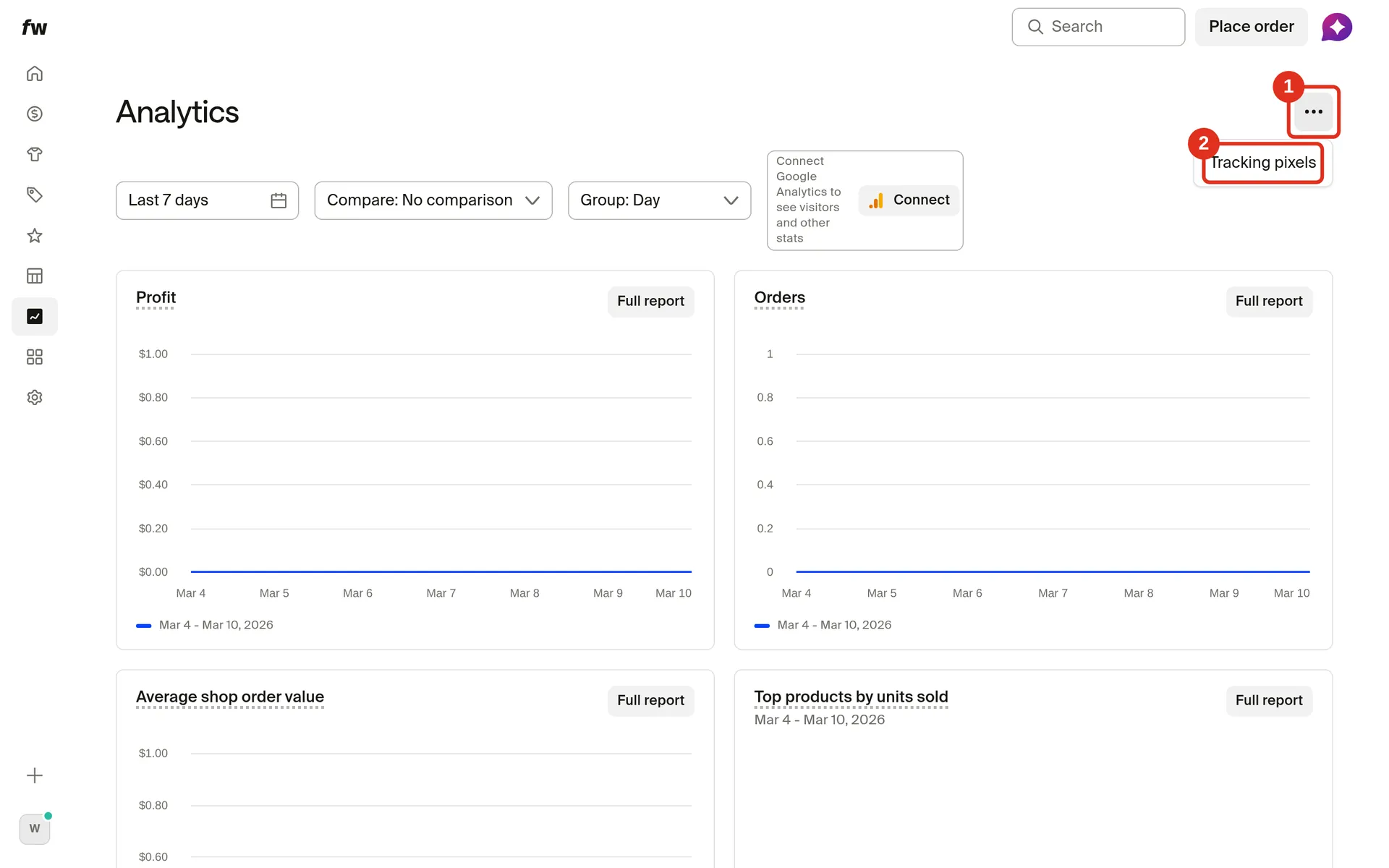
You can also open it from Settings > General: under Analytics and tracking pixels, click Manage tracking pixels.
Add Google Analytics (GA4)
To add Google Analytics 4 to your shop, paste your GA4 Measurement ID into the Google Analytics 4 Tracking ID field on the Tracking pixels page.
-
Open Tracking pixels (Analytics > Options > Tracking pixels).
-
Paste your Measurement ID into Google Analytics 4 Tracking ID, then click Save in the Unsaved changes bar at the top of the page.
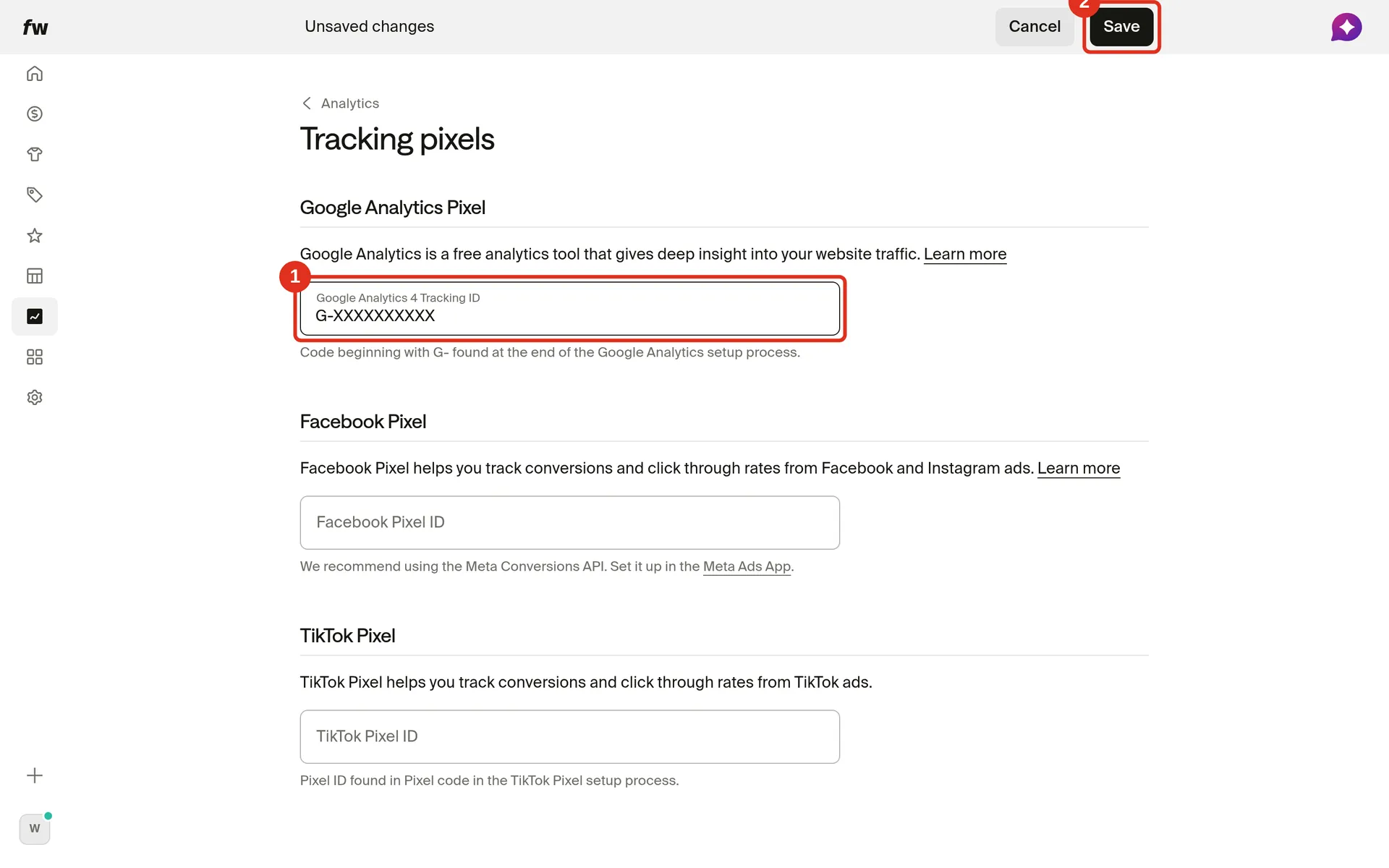
The ID must be G- followed by 10 uppercase letters or numbers, for example G-XXXXXXXXXX. Fourthwall doesn't accept an ID in any other format.
Adding the Tracking ID doesn't show visitor stats inside Fourthwall analytics. For those, also click Connect on the Analytics page and connect your Google Analytics account.
Fourthwall sends standard GA4 events automatically: page views, product views, add-to-cart, and purchases. You do not need to add custom event code.
To find your Measurement ID, go to your Google Analytics account, open Admin, select your property, and click Data Streams. Your Measurement ID appears at the top of the stream details.
Add Meta Pixel
To add a Meta Pixel to your shop, paste its Pixel ID into the Facebook Pixel ID field on the Tracking pixels page. The dashboard calls it Facebook Pixel.
- Open Tracking pixels (Analytics > Options > Tracking pixels).
- Paste your Pixel ID from Meta Events Manager into Facebook Pixel ID, then click Save in the Unsaved changes bar at the top of the page.
Fourthwall fires standard Meta Pixel events: PageView, ViewContent (product views), AddToCart, and Purchase. These events include all standard metadata Meta expects.
For retargeting and more accurate conversion tracking, Meta also offers the Conversions API. For full setup details see:
Add TikTok Pixel
To add a TikTok Pixel to your shop, paste its Pixel ID into the TikTok Pixel ID field on the Tracking pixels page.
- Open Tracking pixels (Analytics > Options > Tracking pixels).
- Paste your Pixel ID from TikTok Ads Manager into TikTok Pixel ID, then click Save in the Unsaved changes bar at the top of the page.
Fourthwall fires TikTok Pixel events for page views, product views, add-to-cart, and purchases, so you can run TikTok conversion campaigns and build remarketing audiences.
To find your Pixel ID, go to your TikTok Ads Manager account, open Assets > Events, and select Web Events. Your Pixel ID appears in the pixel list.
Verify tracking is working
After adding a pixel, confirm it is firing before running ads.
Google Analytics (GA4): Install the Google Analytics Debugger Chrome extension, visit your shop, and check for events in the browser console. You can also use the Realtime report in GA4 to confirm sessions are being recorded.
Meta Pixel: Install the Meta Ads Data Advisor Chrome extension (formerly Meta Pixel Helper), visit your shop, and confirm the pixel fires. You can also use Test Events in Meta Events Manager.
TikTok Pixel: Visit your shop, then check for test events in TikTok Ads Manager under Web Events.
Frequently asked questions
Do I need third-party analytics if I already use Fourthwall analytics?
You don't necessarily need third-party analytics on top of Fourthwall analytics. Fourthwall analytics shows sales, orders, and profit with no setup, but visitor, session, and conversion-rate stats need a connected Google Analytics account. Third-party pixels add value if you run paid ads (Meta and TikTok Pixel), need data in your existing Google Analytics setup, or want to retarget visitors.
Can I use all three pixels at the same time?
Yes. Each pixel is independent. You can run Google Analytics, Meta Pixel, and TikTok Pixel simultaneously with no conflicts.
Will adding pixels slow down my shop?
Pixels load asynchronously and should not affect page speed. Fourthwall loads pixel code in a way that does not block page rendering.
Do pixels fire on customer-facing checkout?
Fourthwall fires purchase events — including order value and product data — on the order confirmation page. This means conversion data reaches your third-party tools for completed purchases.
Does adding a pixel affect the Fourthwall native analytics?
Adding a pixel ID doesn't change Fourthwall's own sales and order reports. Pasting a Google Analytics 4 Tracking ID also doesn't add visitor stats to your Fourthwall dashboard: those need a connected Google Analytics account, which you set up with Connect on the Analytics page.