Connect Your Etsy Shop
Updated June 23, 2026
Sync your Fourthwall products to Etsy and reach buyers already shopping the marketplace
Not yet available: The Etsy integration isn't live for general availability yet. The team is building it, and there's no specific ETA right now. That's why you won't see it on your dashboard or in your integrations list. The integration will roll out in waves, and we'll update this article with the access conditions (plan tier, shop region, and any opt-in form) once it ships. For now, watch for an announcement or reach out at support@fourthwall.com.
Etsy puts your merch in front of millions of customers who shop there every day. Connect your Fourthwall shop to Etsy in a few clicks, and Fourthwall handles printing, fulfillment, and order sync so your inventory stays in one place.
How the Etsy integration works
Fourthwall acts as your production partner on Etsy. You manage products in Fourthwall, and we push them to Etsy as listings you can review and publish. Orders placed on Etsy sync back into your Fourthwall dashboard, and we print and ship them on your behalf.
- Products live in Fourthwall. Edit titles, images, and variants in your Fourthwall dashboard, then push them to Etsy.
- Listings start as drafts. Every product Fourthwall sends to Etsy lands as a draft. You review and publish each one in Etsy Shop Manager before it goes live.
- Orders sync to Fourthwall. Etsy orders flow into your dashboard with status updates, and Fourthwall fulfills them.
Step 1: Connect Etsy from the Apps dashboard
Go to Apps in your Fourthwall dashboard and click the Etsy app card.

On the Etsy app page, click Connect to start the OAuth flow.

Etsy will ask you to sign in and authorize Fourthwall to access your shop. Once you approve, you'll land back on the Etsy app page with a Connected tag.
Step 2: Set Fourthwall as your production partner on Etsy
Etsy requires every Fourthwall listing to declare Fourthwall as a production partner. You add the partner once in Etsy Shop Manager, then pick it inside your Fourthwall dashboard.
Open your Etsy production partners page and add a new partner with these exact values:
- Partner's role: They do everything for me
- Location: Venice, California, United States of America
- What they do for you: Prints and fulfills on-demand merchandise (apparel, accessories, etc.) and ships orders directly to buyers on my behalf.
Important: The Location must match exactly. Etsy normalizes addresses, so any other location means Fourthwall can't be attributed as the partner and your listings won't publish.
Back in Fourthwall, the Etsy app page shows a First, set your production partner panel listing every partner on your Etsy shop. Pick the Fourthwall partner you just created and click the checkmark to set it as the default.
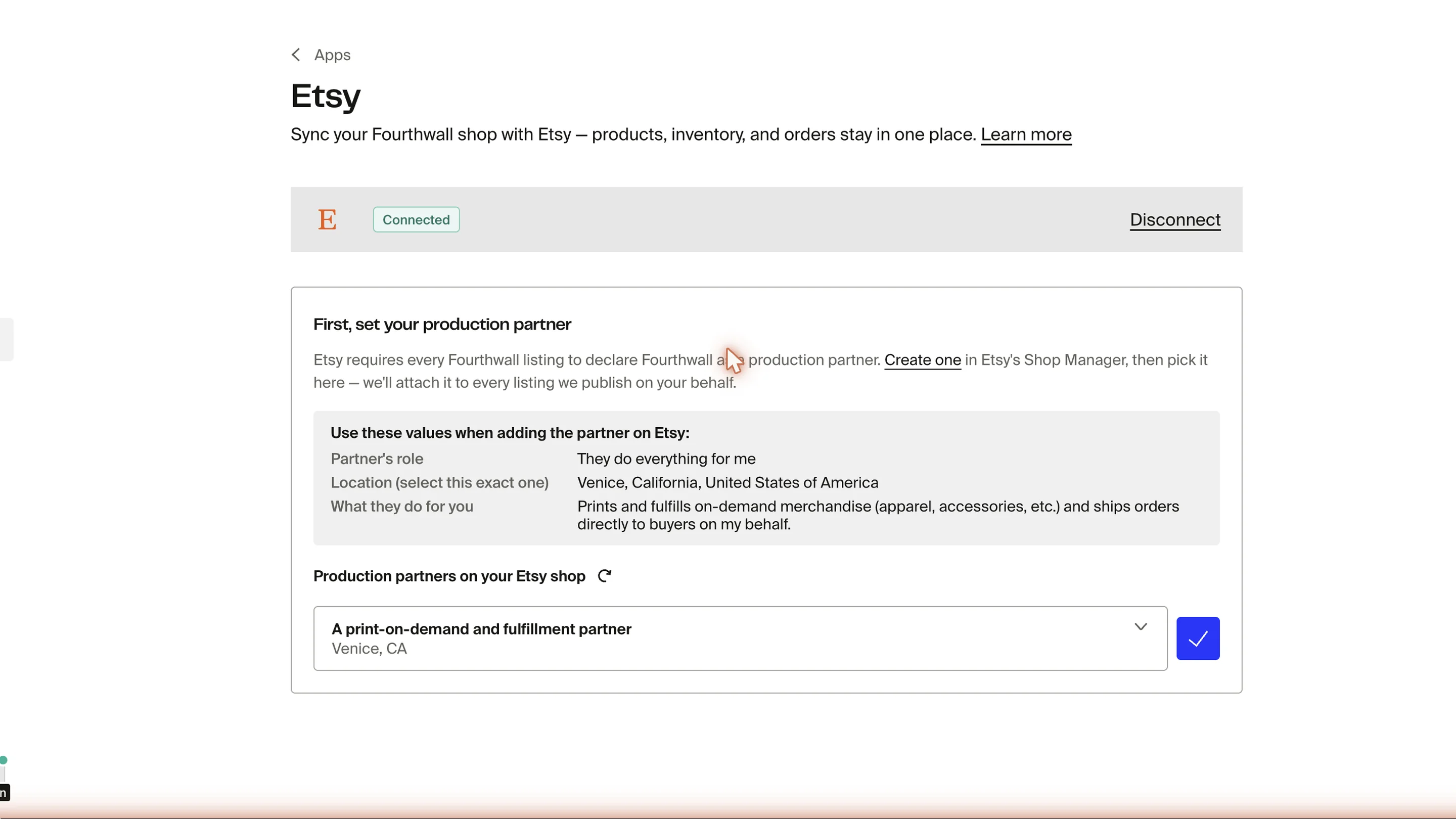
If your partner doesn't appear, click the refresh icon next to Production partners on your Etsy shop. Fourthwall re-fetches the list from Etsy.
Step 3: Publish listings from the Listings tab
Once your production partner is set, the Listings and Orders tabs appear on the Etsy app page. The Listings tab shows every Fourthwall product eligible for Etsy, along with its current status.
Use the Status dropdown to filter by:
- All: every eligible product
- Live: listings currently published on Etsy
- Drafts: listings pushed to Etsy but not yet published by you
- Errors: listings that failed to publish or were deactivated
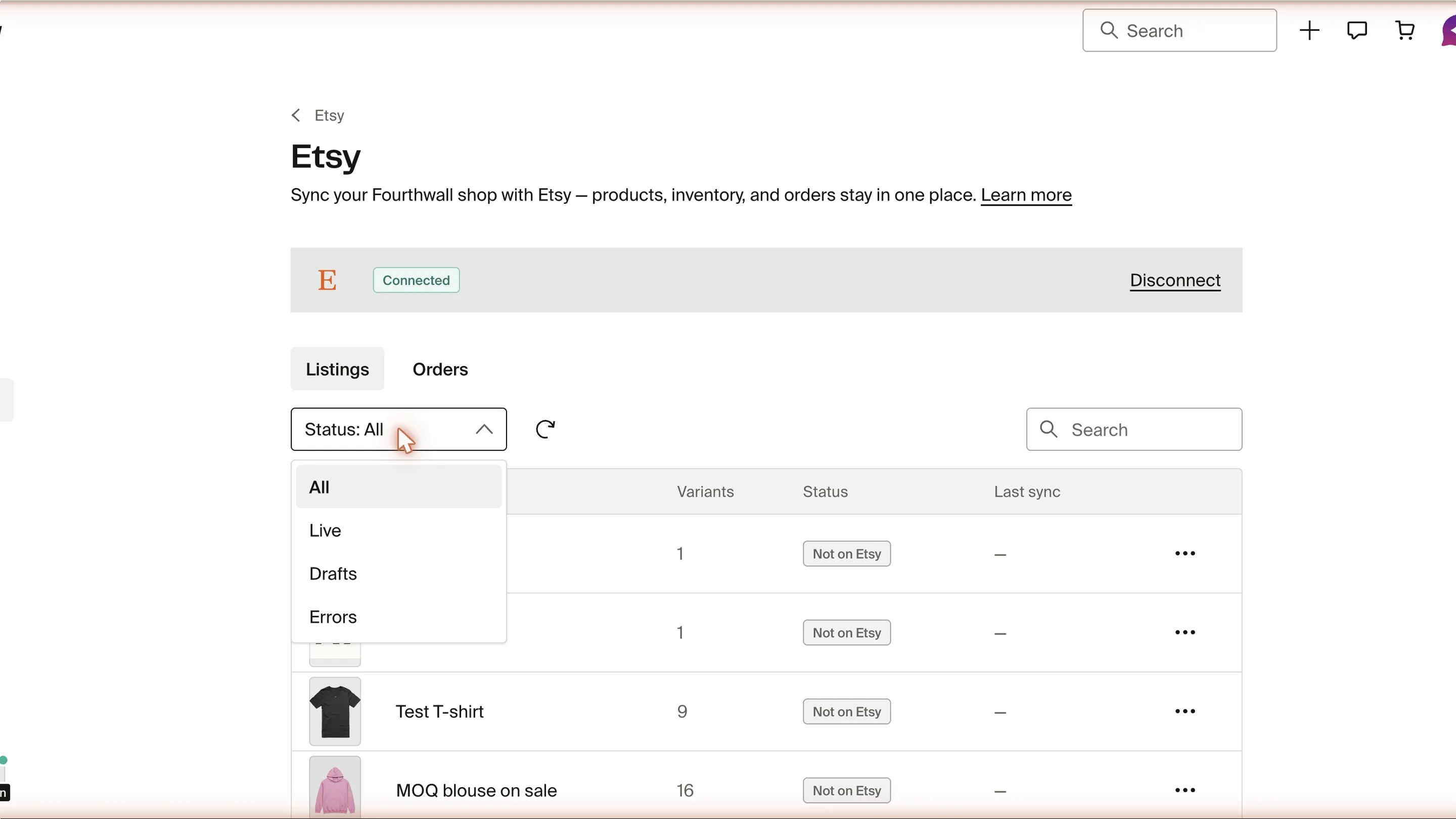
To push a product to Etsy, click Publish on its row. The listing preview opens so you can customize what customers on Etsy will see.
The action on each row depends on its status: a draft or published listing shows Open on Etsy to view it directly on Etsy, and a listing with an error shows Retry to attempt publishing again or Clear to dismiss the error.
Customize a listing before publishing
The listing preview lets you edit:
- Title: up to 140 characters. Front-load search keywords customers will type.
- Description: the listing description Etsy buyers see. It's required before you can publish.
- Tags: up to 13 tags, each up to 20 characters. Use specific, searchable terms.
- Etsy taxonomy: pick the category that best matches your product. Etsy uses this to surface your listing in the right search results.
- Margin: set a single margin — as a percentage or a flat dollar amount — that Fourthwall adds on top of each variant's cost to set its Etsy price. This affects your Etsy prices only and won't change prices in your Fourthwall shop.

When you're ready, click Publish to Etsy. The listing is pushed to your Etsy shop as a draft.
Every listing Fourthwall publishes lands in Etsy as a draft. Open Etsy Shop Manager, review the listing one last time, and publish it from there to make it live. Drafts won't appear to buyers until you publish them on Etsy.
If you push a draft to Etsy and then edit something on Etsy directly, click Refresh drafts on the Listings toolbar to pull the latest status back into Fourthwall.
Step 4: Track Etsy orders from the Orders tab
Etsy orders sync into your Fourthwall dashboard so you can track them alongside your other sales. Open the Orders tab on the Etsy app page to see every order that came in through Etsy.
Filter orders by Status and search by buyer name or order number. Click a row to open the order detail panel, which shows the order's status, its items, the shipping address, and a cost breakdown (subtotal, shipping, tax, and total). From there, View on Etsy opens the order on Etsy and Open in Orders jumps to it in your main Fourthwall orders list. If an order ran into a problem, the panel explains what went wrong and what to do next.
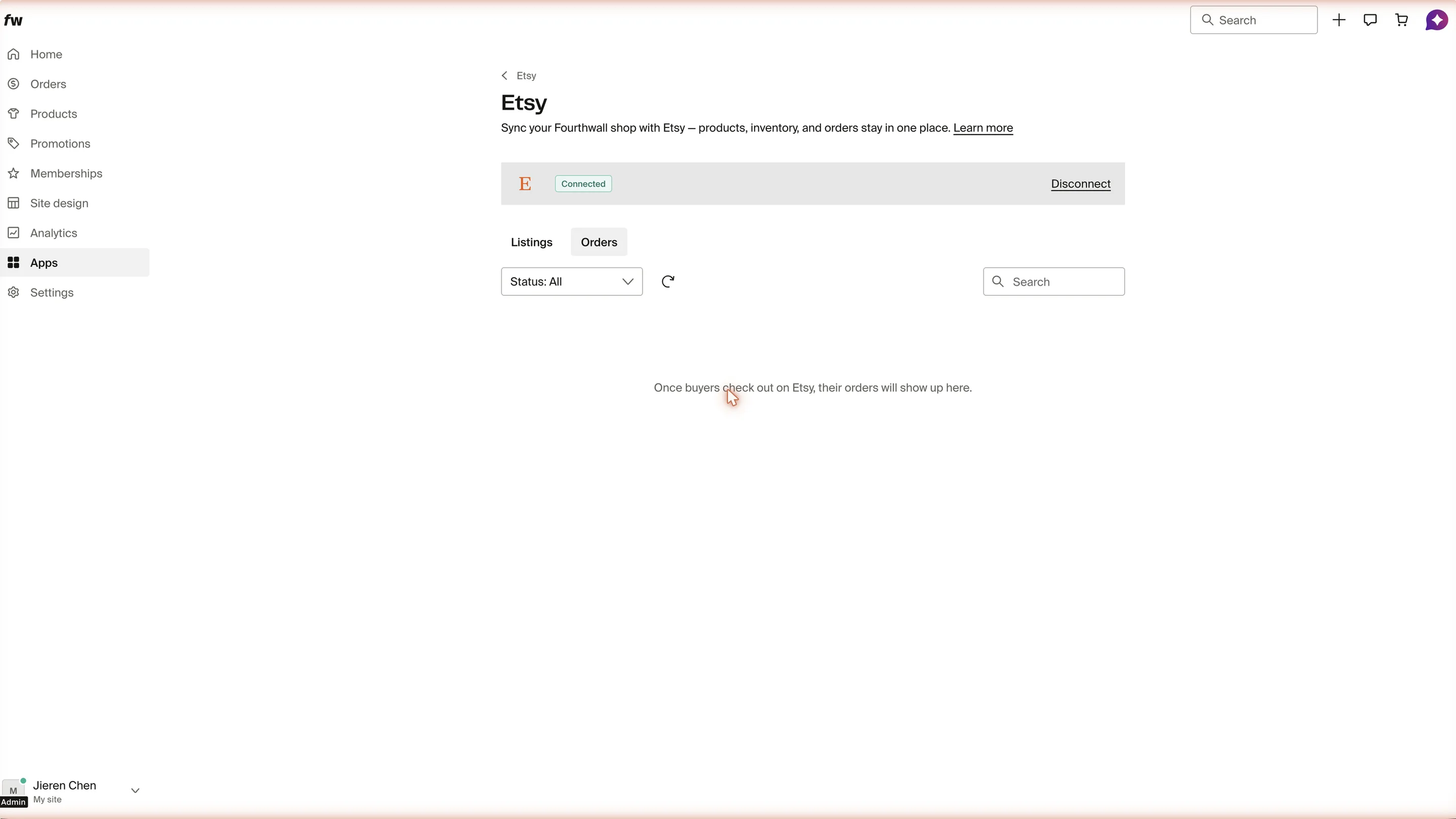
Fourthwall fulfills these orders the same way it handles your other on-demand sales. Shipping updates flow back to Etsy automatically once the order ships.
Etsy orders move through these statuses:
- In progress: Fourthwall received the order and is producing and shipping it. Nothing is needed from you.
- Shipped: the order shipped and the tracking number synced back to Etsy, so the buyer can track their package.
- Cancelled: the order was cancelled and won't be fulfilled. If the buyer already paid, issue any refund on the Etsy side.
- Error: Fourthwall couldn't process the order automatically. Open the order to see the reason and a suggested fix, or contact support.
The All filter shows every order regardless of status.
Cancelling an Etsy order
Cancel Etsy orders on Etsy, not from Fourthwall. The buyer paid through Etsy, and Fourthwall can't push a cancellation back to Etsy. If you cancel from Fourthwall, the order stays open on Etsy and you'll have to cancel and refund it there anyway.
How a cancellation is handled depends on when and where it happens:
- Cancelled on Etsy before it ships: the clean path. Fourthwall stops the order before production or shipping, and there's nothing more to do.
- Cancelled on Etsy after it ships: the order already shipped and can't be reversed automatically. Fourthwall reconciles the order on our end, and you settle the return or refund with the buyer on Etsy.
- Cancelled from Fourthwall: Fourthwall stops fulfillment on our side, but the order stays active on Etsy. You still need to cancel and refund the buyer in Etsy Shop Manager — which is why it's better to start the cancellation on Etsy.
Reconnect Etsy if the connection expires
Etsy access tokens expire from time to time. If the connection lapses, the Etsy app page shows a Requires reconnect tag and a warning banner: "Your Etsy connection has expired. Reconnect to keep syncing your shop."
Click Reconnect Etsy shop to re-authorize Fourthwall. Your Etsy shop, partner setup, and existing listings stay intact, so you pick up right where you left off.
Frequently asked questions
I don't see the Etsy app card on the Apps page. What should I do?
Try navigating directly to Apps using the link, then scroll down to look for the Etsy card. If it still doesn't appear, refresh the page or clear your browser cache and try again. If the card is missing after those steps, contact support@fourthwall.com for help.
Do my Etsy listings go live automatically?
No. Every listing publishes to Etsy as a draft. You need to review and publish each one in Etsy Shop Manager before buyers can see it.
Can I sell self-fulfilled or self-sourced products on Etsy?
The Etsy integration is built around Fourthwall's production-partner model, so on-demand products from the Fourthwall catalog work best. Other product types may not meet Etsy's requirements for production partner listings.
Can I sell digital products or gift cards on Etsy?
No. The Etsy integration only supports on-demand physical products from the Fourthwall catalog. Digital downloads and gift cards aren't eligible.
What happens if I edit a product in Fourthwall after publishing to Etsy?
Nothing syncs to Etsy. Once a listing is published, you manage it on Etsy — edits you make in Fourthwall afterward won't change the Etsy listing. Update the title, description, price, and other details directly in Etsy Shop Manager. (If you edit the listing on Etsy, click Refresh drafts on the Listings tab to pull its latest status back into Fourthwall.)
Why does my production partner show an error?
Etsy normalizes the partner's location to City, State format. If the location doesn't match Venice, CA after normalization, Fourthwall can't confirm the partner is set up correctly. Edit the partner on Etsy and pick the exact Venice, California, United States of America option from the location dropdown.
Do my existing Etsy listings sync into Fourthwall?
No. Only listings you publish through Fourthwall appear in the Listings tab. Listings you created directly on Etsy stay on Etsy and aren't managed from your Fourthwall dashboard.
Can I connect more than one Etsy shop?
No. Each Fourthwall shop syncs with one Etsy shop at a time. Disconnect the current Etsy shop on the Etsy app page before connecting a different one.
Can I disconnect my Etsy shop?
Yes. On the Etsy app page, click Disconnect. Your listings stay on Etsy in their current state, but Fourthwall will stop syncing products and orders until you reconnect.
Where do I get paid for Etsy orders?
Etsy pays you directly for orders placed on Etsy. Fourthwall charges your shop balance or payment method on file for the cost of producing and shipping each order.
Does Etsy charge fees on top of Fourthwall's costs?
Yes. Etsy charges its own listing, transaction, and payment processing fees on top of what Fourthwall charges to produce and ship each order. See Etsy's fees and payments policy for the latest amounts.
Why doesn't my Etsy shipping charge match what Fourthwall bills me?
There's likely to be a gap between what you charge buyers for shipping on Etsy and what Fourthwall charges you to ship the order. Etsy doesn't support dynamic shipping rates — it only lets you set fees by destination region. We've set broad rates on Etsy at the moment: domestic is $8 for the first item and $3 for each additional item, and international is $12 for the first item and $5 for each additional item. Fourthwall's actual shipping cost, on the other hand, is calculated by destination and fulfiller.
We based these Etsy rates on the last 90 days of data, so on average you should profit slightly — but there are cases where you could take a small loss. Just good to be aware of when you price your listings.
You can change all of these rates yourself in your Etsy shipping profile. Open Etsy Shop Manager, edit the shipping profile applied to your Fourthwall listings, and set the domestic and international rates that work for your shop.
How are returns and refunds handled for Etsy orders?
Buyers reach out through Etsy, and you handle returns and refunds on the Etsy side. For cancellations, Fourthwall will also attempt to cancel the order on our end if the request comes in before fulfillment begins.
If you have any questions, do not hesitate to contact us at support@fourthwall.com.