Set up your custom domain
Updated October 27, 2026
Steps to connect, configure DNS records, and troubleshoot domain setup and verification delays
Connecting a custom domain to your Fourthwall site (e.g., example.com) gives you a fully branded URL. Instead of directing fans to your Fourthwall subdomain, you can send them to your own domain for a more professional and trustworthy experience.
Custom domain connection is available on every Fourthwall plan, including Free and Fourthwall Pro. You don't need a paid plan to connect your own domain.
Buy your own domain
To connect a custom domain, you need to own the domain you want to connect. If you haven't purchased a domain yet, we recommend using Porkbun. It is user-friendly and affordable.
Fourthwall Pro also includes a free .store domain. To claim it, see How to Claim Your Free Domain.
Can I keep my existing website?
You can keep your existing website on your root domain (example.com) and connect your Fourthwall shop to an unused subdomain, such as shop.example.com or merch.example.com. If your website is on Squarespace, Wix or another host, use a subdomain for your shop.
Important: Pointing your root domain to Fourthwall sends visitors to your shop instead of your existing website. When the A record for example.com and the CNAME record for www.example.com point to Fourthwall, visitors to those addresses reach your shop. Changing those A and CNAME records only changes where visitors go. It doesn't move or delete your website's content.
To keep both:
- Connect a subdomain, such as
shop.example.com, using the steps in Connect your domain. - Add only the records Fourthwall lists for that subdomain. Leave the
example.comandwww.example.comrecords pointing to your website host, and leave your email records as they are. - Add a link to
shop.example.comon your existing website so visitors can find your merch.
If your existing website was already replaced by your shop, see My existing website was replaced by my Fourthwall shop.
Can I use example.com/merch for my shop?
No, not through the custom domain form. Connect domain accepts a domain or subdomain, such as example.com or shop.example.com, not a path like example.com/merch. Use shop.example.com or merch.example.com for your shop instead, and link to it from your existing website.
Connect your domain
Connecting a custom domain doesn't require you to disconnect and reconnect Fourthwall's YouTube Product Shelf or Instagram & Facebook Shop. Fourthwall handles the product links for both.
Avoid removing a custom domain that's already connected. On some accounts, removing an active custom domain can prevent you from reconnecting it on your own. Contact us at support@fourthwall.com with your shop URL and the domain name before you remove an active custom domain.
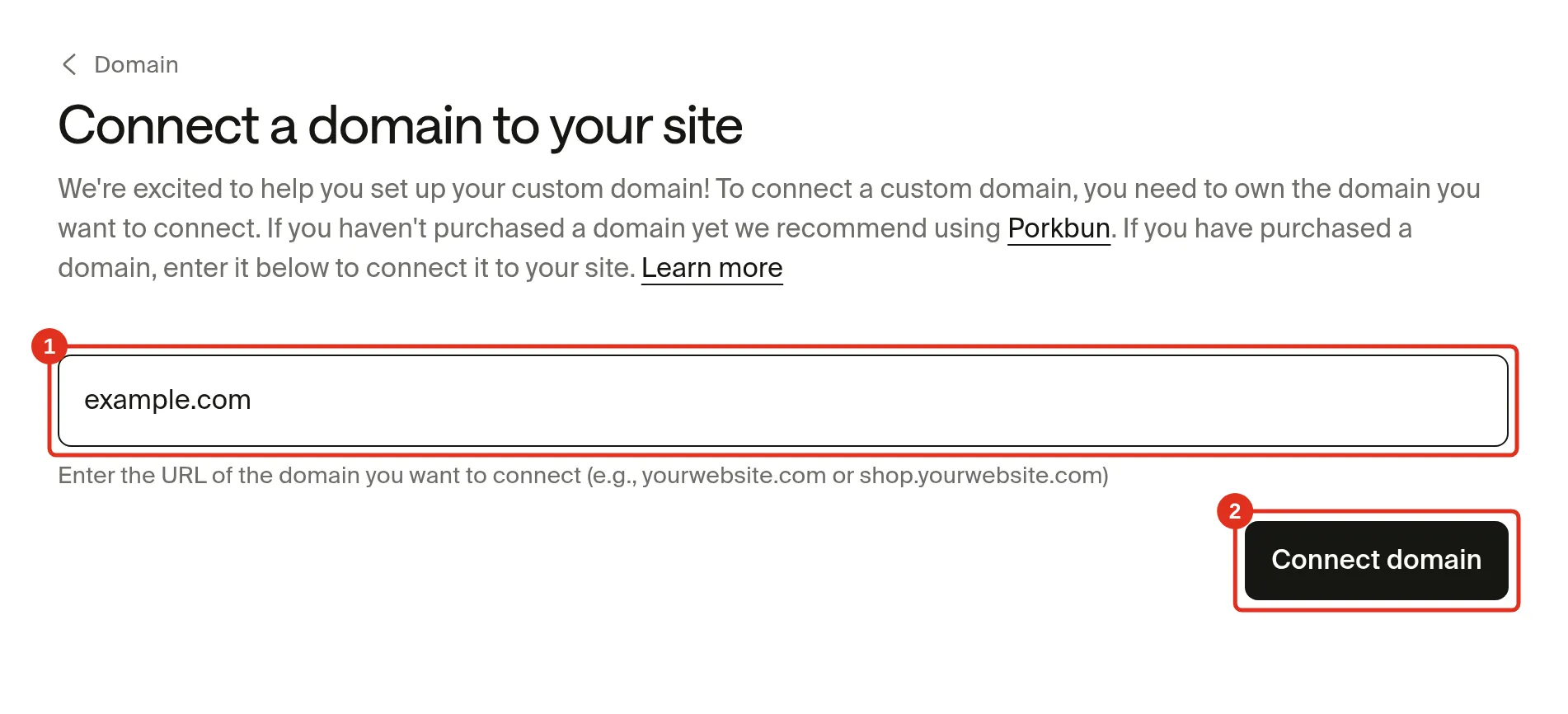
Go to Settings > Domain and click Connect domain.

Enter your domain or subdomain, such as example.com or shop.example.com, without https://, trailing slashes or a path like /merch. Then click Connect domain.
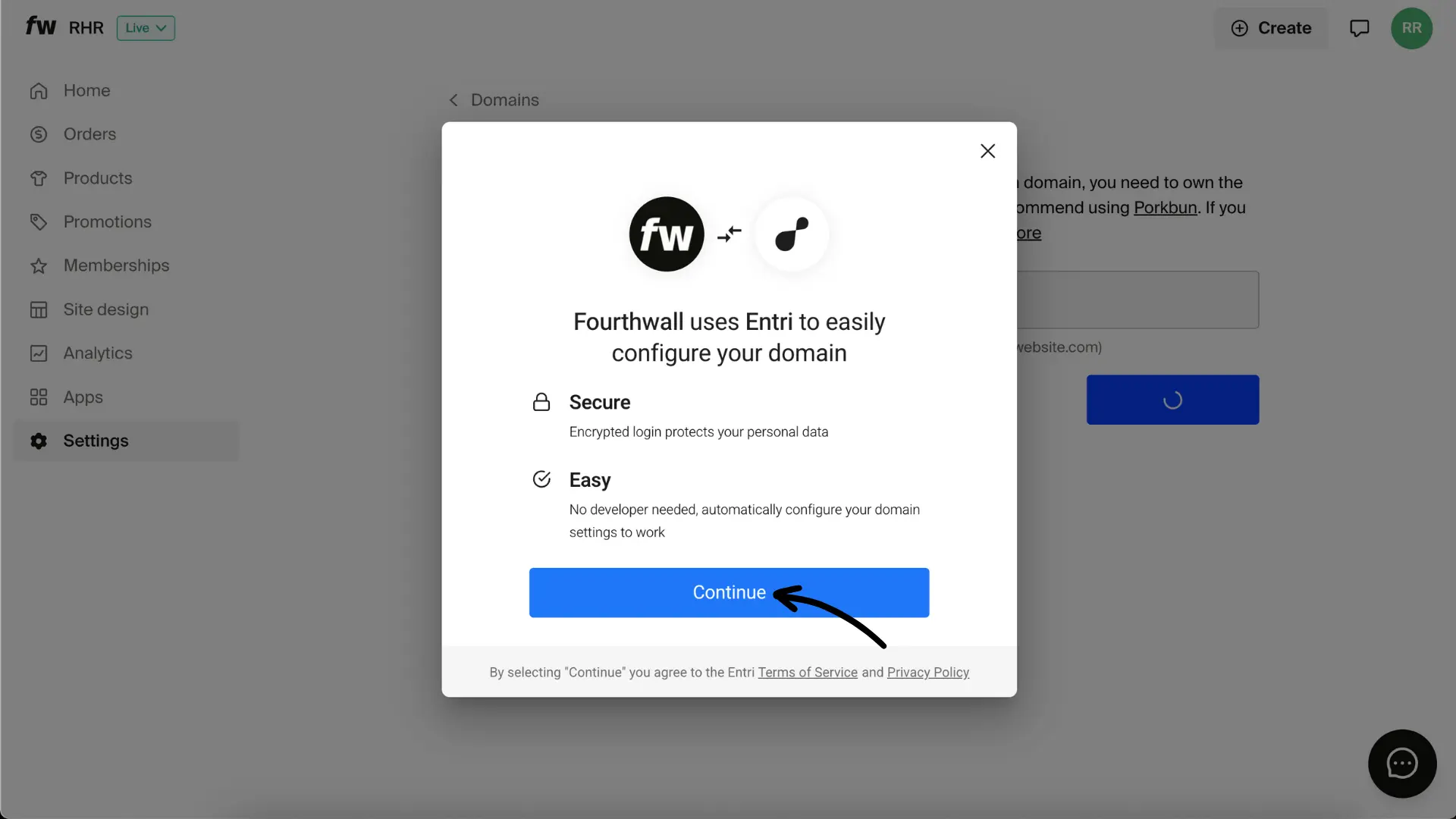
Fourthwall will attempt to configure DNS records automatically using Entri, our integration with popular registrars. Click Continue to proceed.
If your registrar supports Entri, you'll simply authorize the connection, and the DNS records will be added for you. Here's an example:
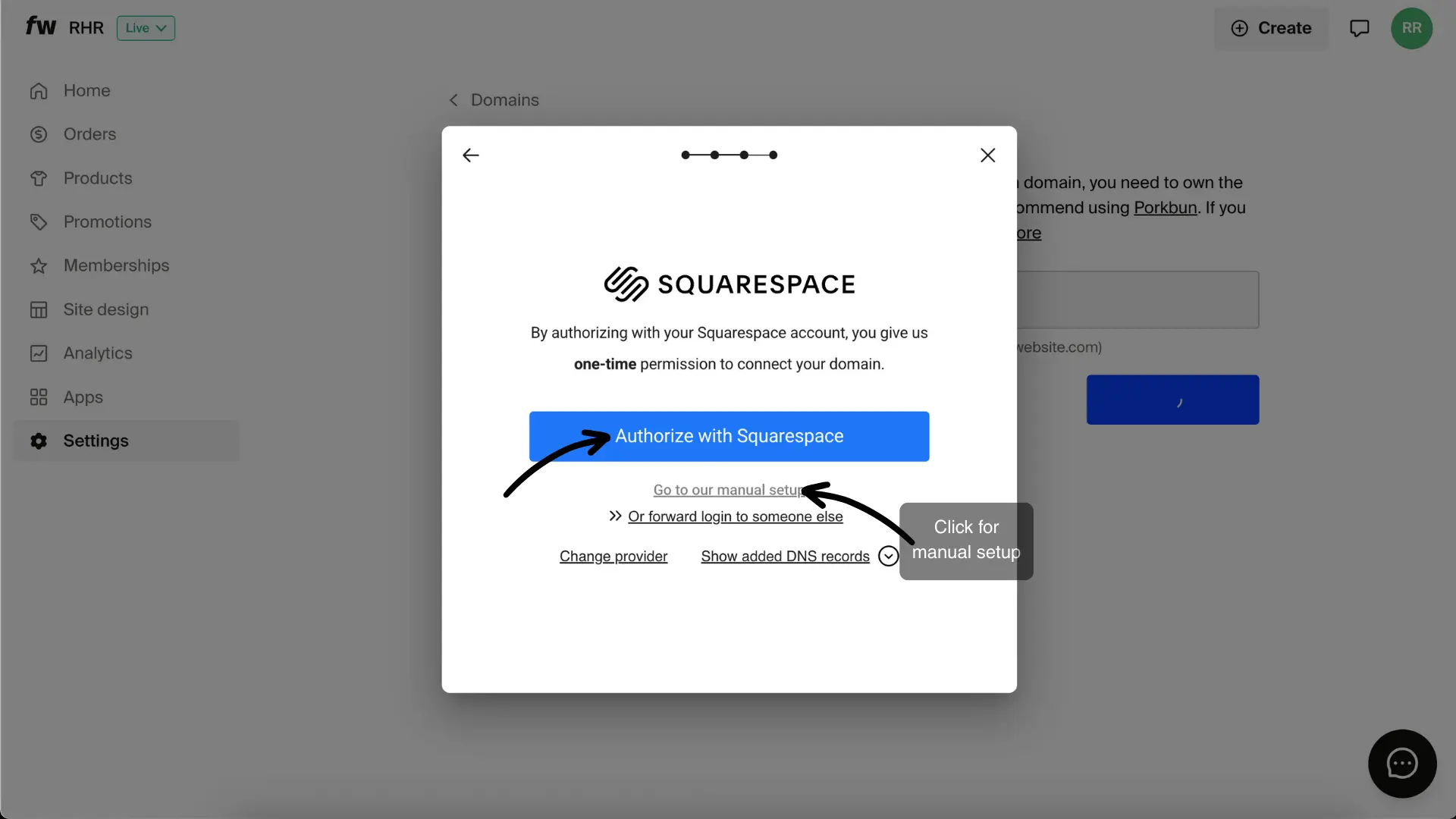
If not, you'll need to copy and paste the DNS records into your provider's DNS settings manually.
Configure the DNS records
If you're entering DNS records manually, Fourthwall lists every record to add at your provider. Add all of them, using the values Fourthwall shows:
- An A record for the exact domain or subdomain you entered, pointing it to Fourthwall's servers.
- A CNAME record for www plus that same domain, so the "www" version resolves to your shop.
- The records on
support.yourdomain.com, which set up your shop's branded customer support email.
For example, if you connected shop.example.com, the A record is for shop.example.com, the CNAME record is for www.shop.example.com, and the support email records are on support.shop.example.com. Leave the records for example.com and www.example.com pointing to your existing website, and leave your email records as they are.
The A record and the www CNAME record make your shop load on your domain. Your domain shows Connected only after the support email records are found too.
If you'd rather not edit DNS records yourself, our team can add them for you. See Can Fourthwall add the DNS records for me?
On Cloudflare, always use DNS Only for your records. Fourthwall already has built-in caching and DDoS protection.
Once you've added the DNS records, click I have added #/# records above to my domain's provider.

Click Done. If added correctly, your domain will be successfully connected.
Verify and wait for sync
Once records are set:
- Fourthwall will attempt to verify your domain automatically.
- Your domain will appear as "Syncing" while SSL certificates are issued. This usually takes 15 minutes, but:
- Some providers set long DNS cache times (TTL), which may delay verification.
- In rare cases, propagation can take up to 24 hours.
Your domain shows one of these statuses in Settings > Domain:
- Not connected: Fourthwall hasn't found your A record and www CNAME record yet. It isn't a verification failure. Add the records, then click Retry connection to check again.
- Partially Connected: your shop loads on your domain, but the support email records on
support.yourdomain.comhaven't been found yet. Add the records marked This record was not found, then click Retry connection. - Connected: every record is found, and your domain is ready to use.
For help with each status, see Troubleshoot your domain and DNS records.
Frequently Asked Questions
How can I tell if my DNS record was entered correctly?
To check if your record was entered correctly, you can visit nslookup.io and type in the record name. If the value matches what Fourthwall's system displays, then it'll sync momentarily. If not, there are usually two common errors:
- The DNS record change hasn't synced. This is displayed via the TTL (time to live) field on nslookup.io. Even if the new record is correct, you'll need to wait the time, in minutes, that is shown in the TTL field before the record can be verified
- The record was entered incorrectly. In this case, you can also compare what is shown on nslookup.io to your Fourthwall list to see the status
How do I migrate a Shopify Domain?
If your domain is on Shopify, follow this article to move to Porkbun domains or your preferred domain provider. Once you have transferred your domain to Porkbun, you can follow the steps at the beginning of this article.
How do I migrate a Teespring Domain?
For Teespring domains, you need to manually contact their support team to move the domain to Porkbun or your preferred domain provider. Once it has been transferred to the new domain provider, you can follow the steps at the beginning of this article.
Do I use "Proxied" records or "DNS only" records on Cloudflare?
When you add records on Cloudflare, please be sure to use the "DNS Only" option for all records. Internally, Fourthwall has its own caching and DDoS protection network.
Can I connect more than one custom domain to my shop?
No. Each Fourthwall shop supports one custom domain at a time. If you own additional domains, you can set them up to redirect to your primary domain through your domain registrar. For example, if your shop uses myshop.com, you can configure myshop.net to redirect to myshop.com so visitors reach the right place. For more details, see Manage multiple storefronts on Fourthwall.
Can I use a subdomain?
Yes. Enter a subdomain such as shop.example.com, and it works the same way as a root domain. A subdomain also lets you keep an existing website on example.com. See Can I keep my existing website?
I got a 403 error when connecting my domain. Do I need Fourthwall Pro?
No. A 403 error does not mean custom domains require Fourthwall Pro. Connecting a custom domain works on every plan. To get help with the error, see I see a 403 error. Do I need Fourthwall Pro?
My account shows a "domains limit: 0." Does that mean I can't connect a domain?
No. A "domains limit: 0" value in your account data is an outdated value and does not gate domain connection to paid plans. You can still connect a custom domain on any plan. If a limit ever blocks you, contact us at support@fourthwall.com with your shop URL, the domain name and a screenshot of the message.
For additional domain FAQs, including troubleshooting details, you can go to Troubleshooting your domain and DNS records.
Troubleshooting delays
- DNS record not syncing? Use nslookup.io to check. Compare the returned values with the records displayed in Fourthwall.
- Record entered incorrectly? Double-check values for typos or missing characters.
- DNS cache still active? If TTL is high, even correct records will take time to refresh; just wait it out.
- Flushing your DNS cache could help your device quickly retrieve updated DNS records after you've changed them, preventing issues with accessing your domain or website.